

 App Store
App guides
How to Buy and Sell Coins and Banknotes with HeriBase
Follow the buyer and seller routes in HeriBase, check listing details, understand fees and balances, and know where to get help.
 HeriBase TeamPublished
In this article
How do you buy or sell coins with HeriBase?
Use Market to browse coin and banknote listings, review the exact item and full order amount, and follow the checkout steps shown in the app. To sell, start from Market → + Sell or the selling option on an identification result, prepare an accurate listing and track the order through your profile. Buyers can return to Purchases; sellers use Posted and Sold, while Bill shows balances and transaction history.
A reference price is not a seller’s asking price or a promised sale. Check the current selling entitlement, transaction charges, shipping terms and order conditions before committing. A subscription does not remove marketplace fees, and a photo identification does not authenticate an item.
The screenshots below come from the existing HeriBase User Guide. They illustrate different listings and orders, not one newly completed purchase or a measured selling result.
Choose the buyer or seller route
Keep the right record in view
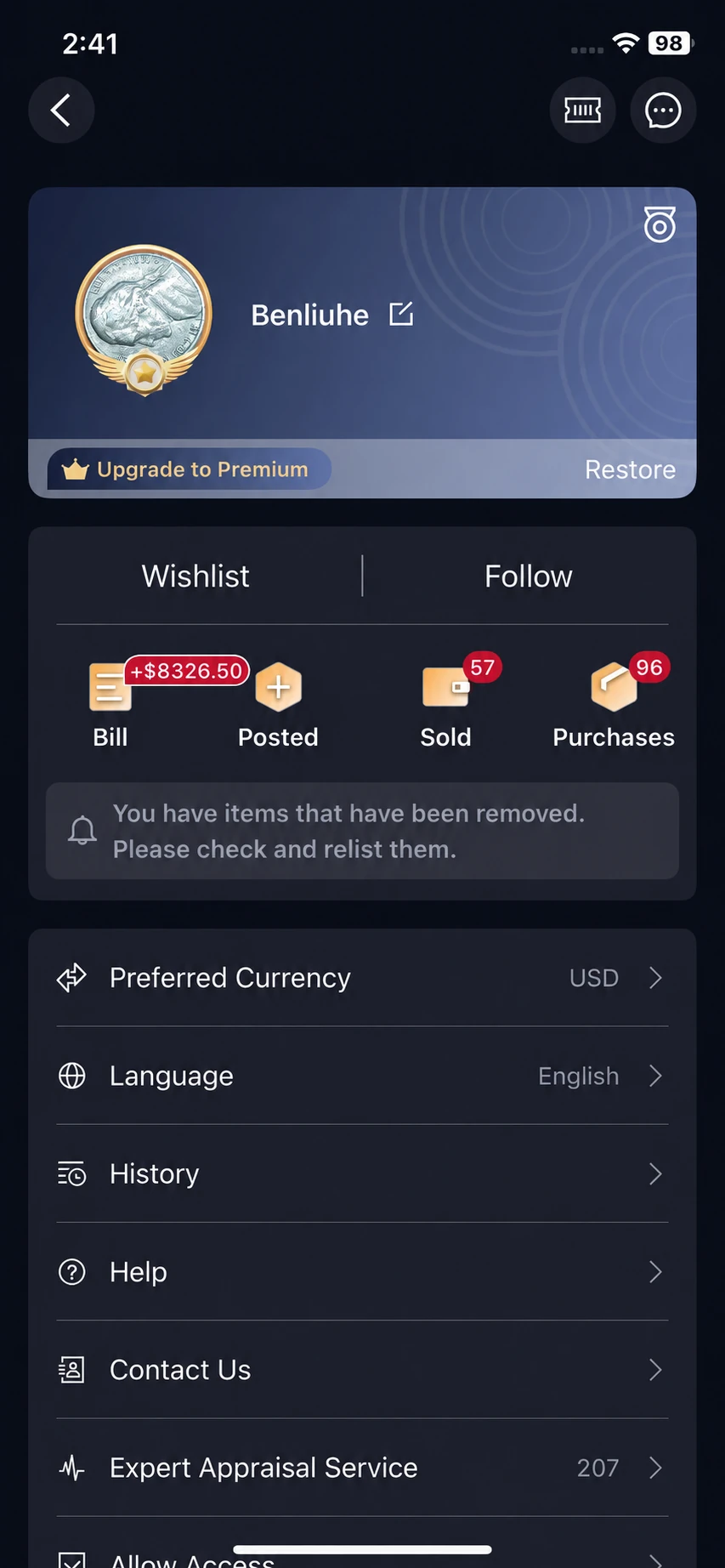
- Purchases: find orders for items you bought.
- Posted: review your On Sale and Removed listings.
- Sold: follow orders for items you sold.
- Bill: distinguish balance entries and transaction history.
Sign in to the account used for the activity. If an order is missing, check the account and retain the order reference before contacting support. For account continuity, see HeritCoin and HeriBase account access.
Buying: review the item before checkout
1. Search for the issue you actually want
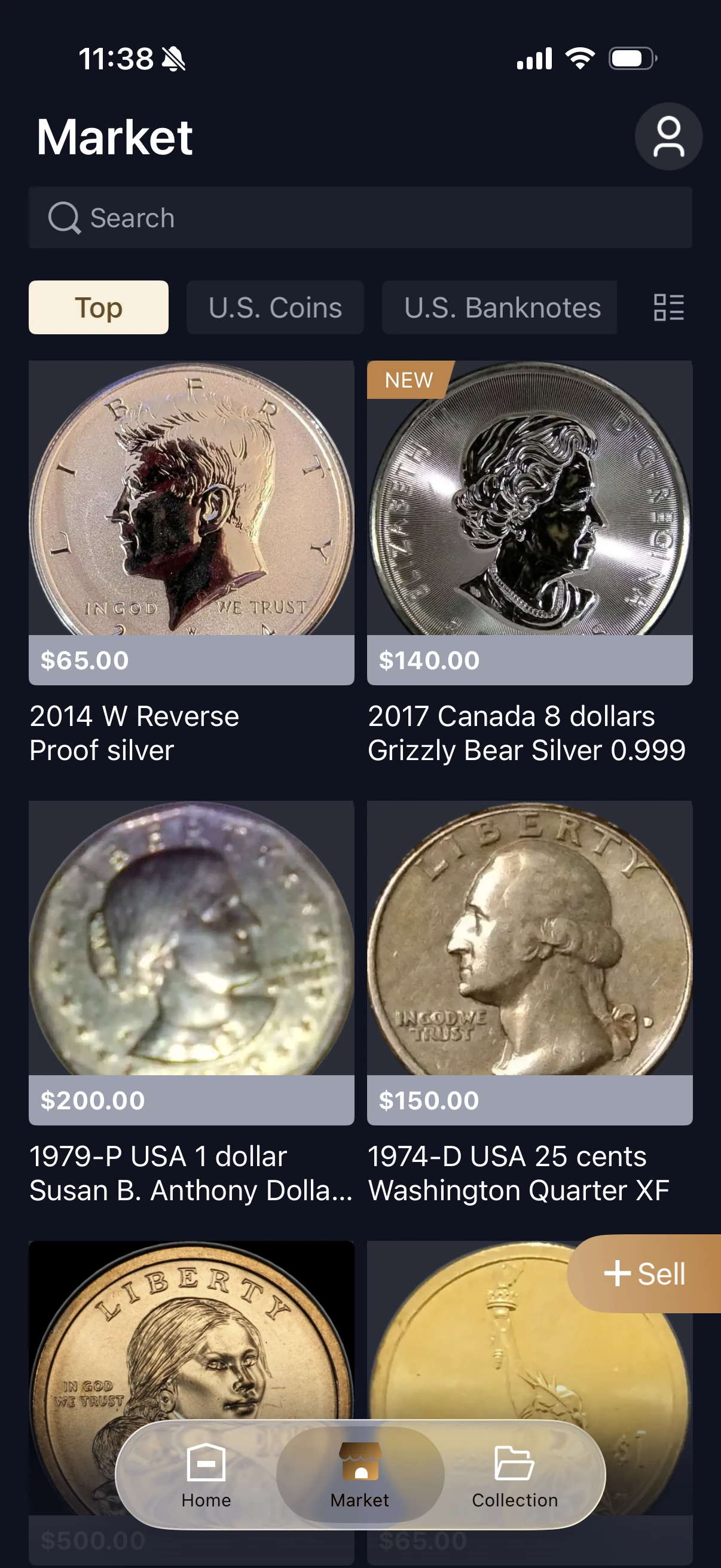
Open Market in the bottom navigation, use search or the available coin and banknote categories, then open a listing. Compare the date, mint mark, denomination and design in its photographs with the description. For banknotes, read the printed series and serial rather than relying on a broad catalog date range.
For example, 1909 VDB and 1909-S VDB cents require different mint-mark checks. A familiar portrait alone is insufficient. Use completed-sale comparisons for price research.
2. Check the complete purchase, not just its headline price
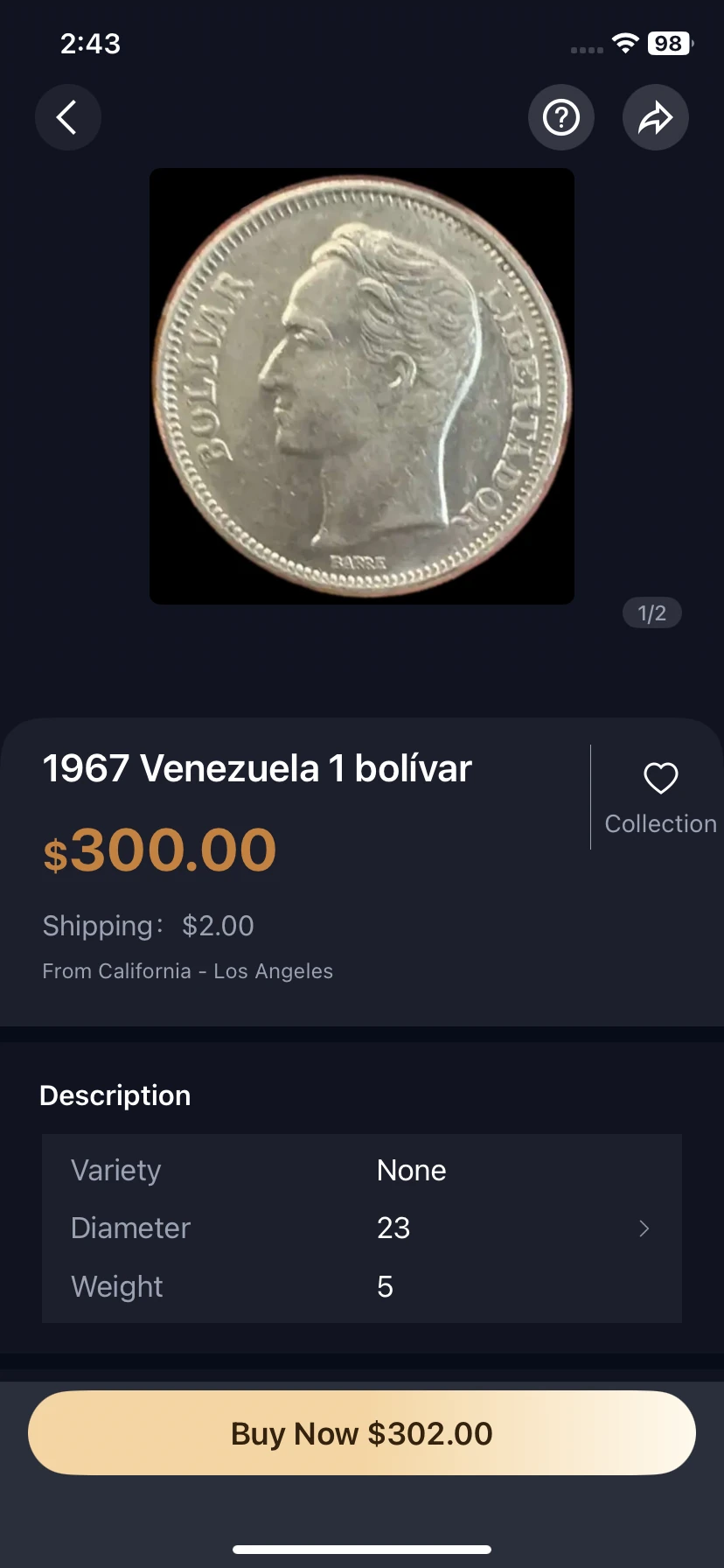
Read the listing photos, condition description, seller information, asking price and delivery charge. Ask about an unclear detail before paying. Confirm whether the pictured item is the one offered and whether any described certification belongs to it.
Tap Buy Now to review the order. Check the recipient, address, full payable amount and applicable terms before confirming. Return to Purchases to follow payment, dispatch, delivery and completion; use only the actions offered for that order status.
Do not infer buyer protection, insurance or a return window from a button or screenshot. Read the terms applying to the actual order and ask support if responsibility for a problem is unclear.
Selling: turn a checked item into a clear listing
1. Prepare the record and publish carefully
Use Market → + Sell, or choose the selling route from an identification result. Prepare clear photographs of both sides and relevant edge or detail views, an accurate description, condition information and your asking price. Review the available form and publication confirmation.
Your saved collection can help you find the item’s photographs and notes; check the listing fields rather than assuming every collection field transfers automatically. See how to keep an organized collection record.
Disclose visible damage, cleaning or uncertainty. Avoid describing an unverified variety or app condition label as professionally certified. State what you know and what remains unconfirmed.
2. Review the published listing
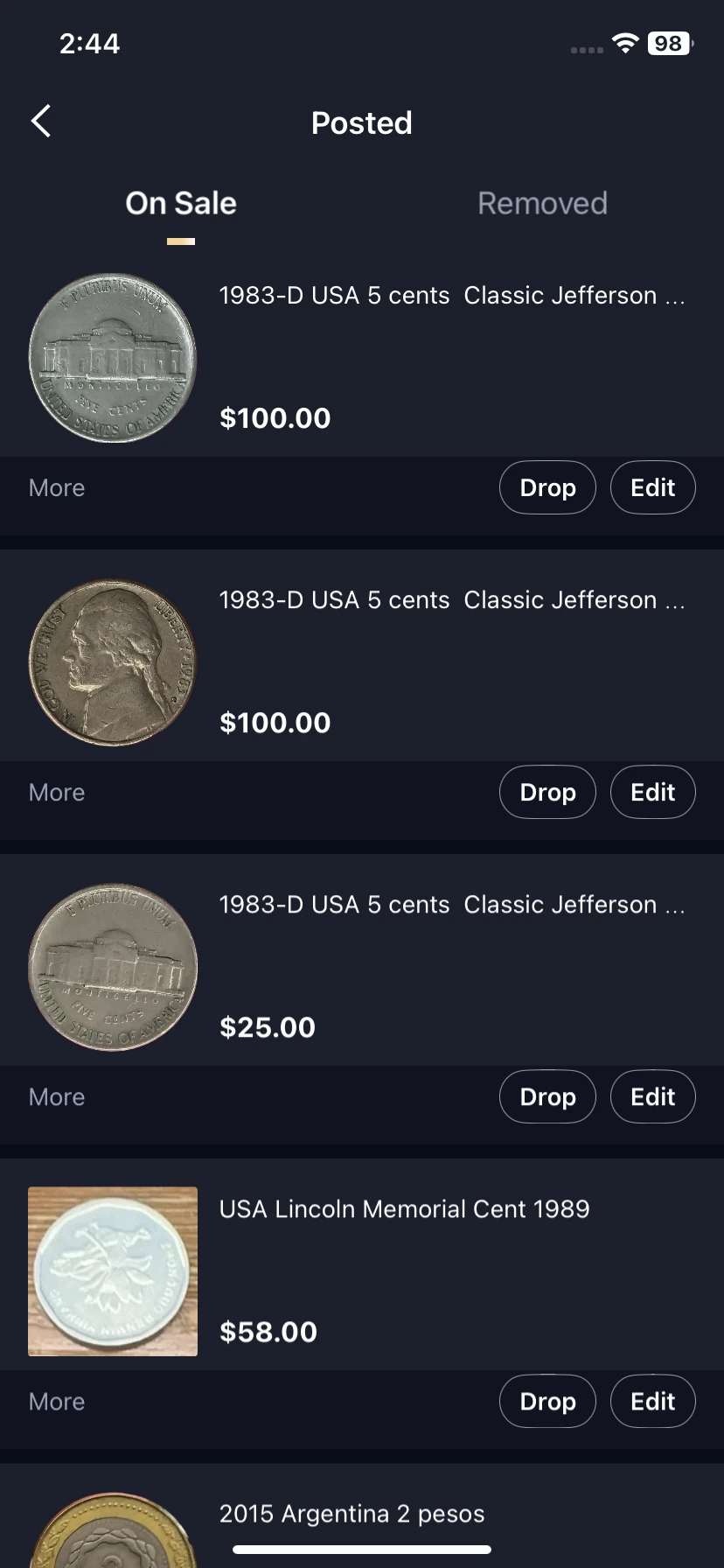
Open your profile → Posted. The illustrated screen has On Sale and Removed tabs. Edit opens available changes; Drop is the displayed removal control. Read its confirmation before removing an item.
3. Verify the paid order before dispatch
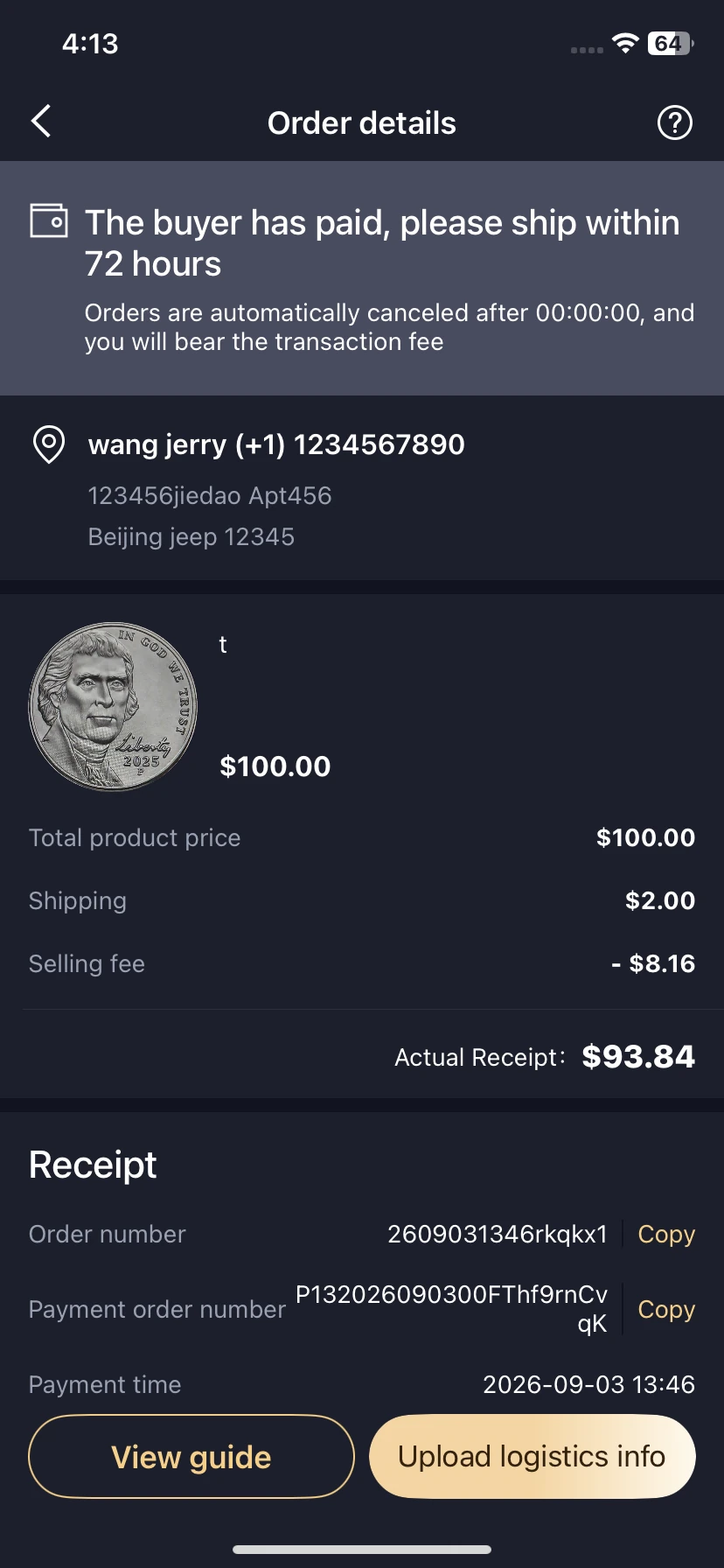
Use the sale notification or profile → Sold to open the order. Check payment status, the correct item, recipient and dispatch deadline. The existing example displays a 72-hour deadline; follow the deadline on your live order rather than treating that example as a rule for every sale.
Keep item photographs and dispatch evidence. A sale reminder is not a substitute for checking the paid order.
4. Add shipping information and follow completion
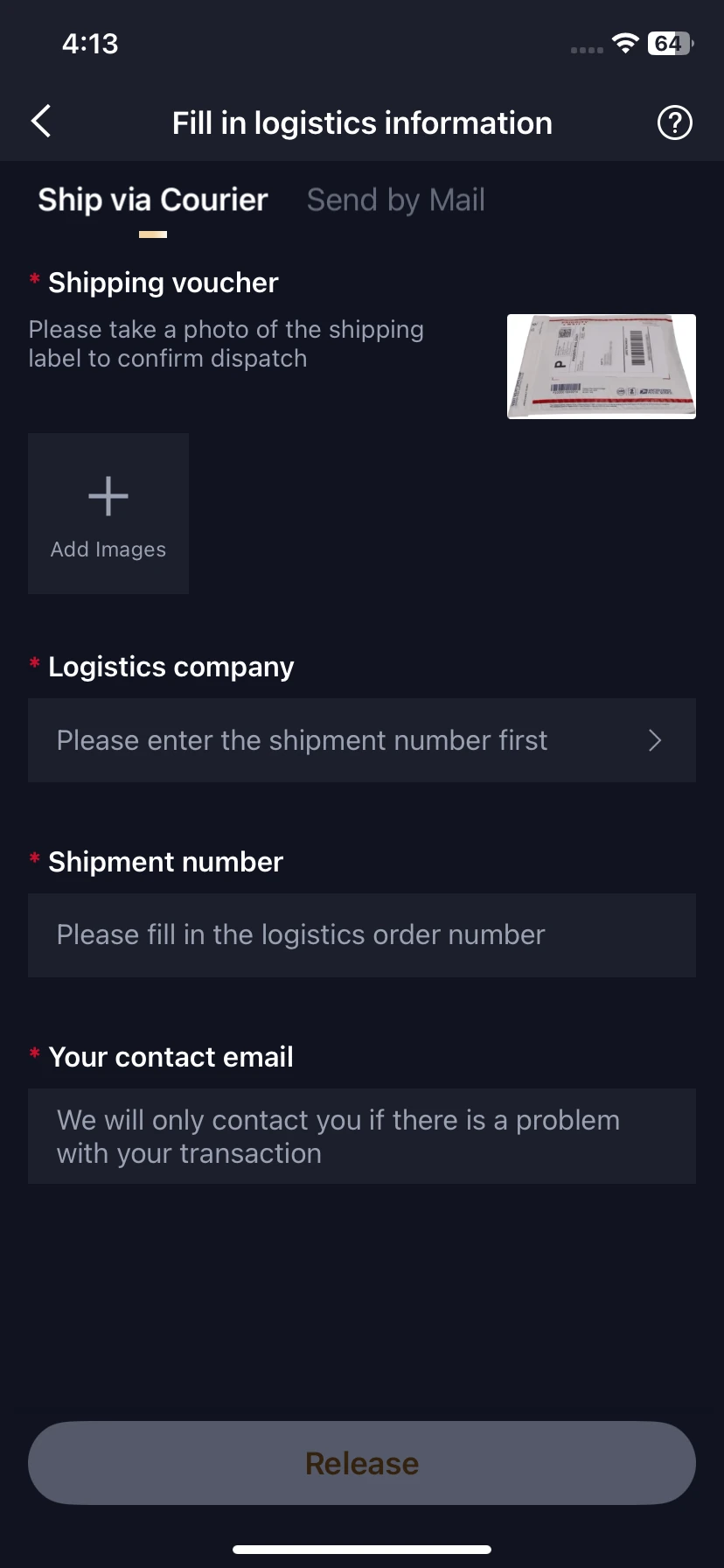
The supplied form shows Ship via Courier, with a separate Send by Mail tab. For the applicable route, add the requested shipping evidence, shipment number, logistics company and contact details. Review the information before submitting, then check that it was accepted on the order.
Follow the order through shipping, receipt and completion in Sold. The screenshots show available controls; they do not establish a guaranteed delivery or settlement time. Detailed controls are documented in the marketplace walkthrough.
Understand price, fees and available funds
These amounts answer different questions
- Reference value: an app estimate used for research.
- Asking price: the seller’s requested amount.
- Order total: the actual purchase breakdown, including applicable delivery and other charges.
- Seller receipt: the amount after the deductions shown on the order.
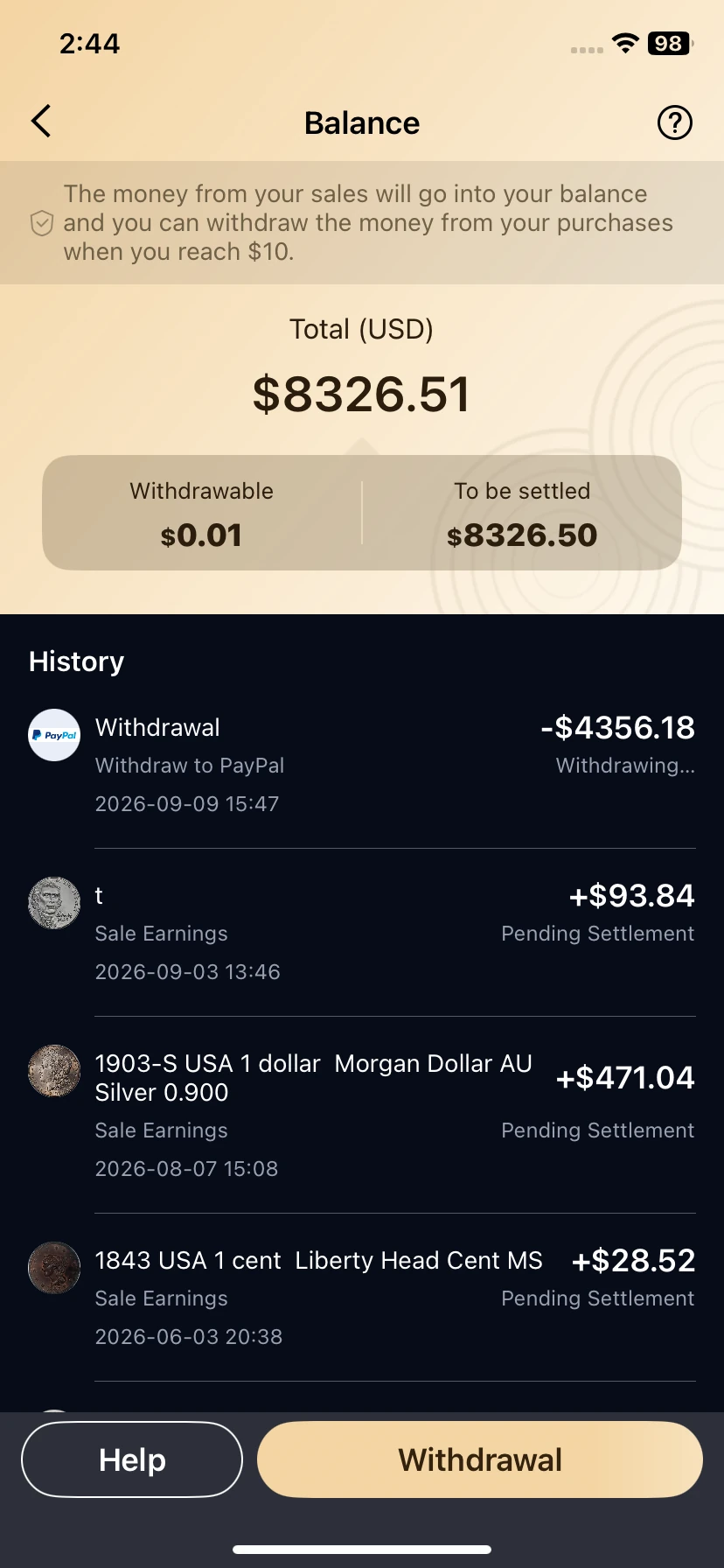
- Withdrawable: funds marked available in the balance; To be settled is a separate state.
The existing guide records an example of US$100 plus US$2 shipping, minus a US$8.16 selling fee, leaving US$93.84. This explains the arithmetic of that example, not a universal fee rate. Check your own breakdown before confirming.
The supplied balance also displays a US$10 withdrawal threshold. Verify the current minimum, settlement conditions and charges in the app or with support. A withdrawal marked in progress is not confirmation of receipt.
Check whether your selected plan includes selling access. Marketplace charges and separately purchased expert appraisal are distinct from subscription payments. See the pricing and subscription guide.
If an item, payment or delivery is disputed
Keep the listing, item photographs, order number, payment status and shipping evidence. Describe the exact issue: an item not matching its description, missing shipment, incorrect payment state or unavailable balance. Contact HeriBase support with the relevant reference; do not send passwords or full payment-card details.
Check the terms for the marketplace order rather than applying app-subscription cancellation rules to it. A subscription refund, an expert-service complaint and a purchase dispute are different requests. Ask who handles the particular payment, return or shipping issue and what evidence is required before taking an irreversible step.
If the unresolved question concerns identity, authenticity or a scarce variety, review how to choose an expert. A photo-based opinion may still leave questions requiring examination in hand.
Before you buy or list an item
Verify the item, read the full financial breakdown and keep the order trail. Buyers should match photographs and description before checkout. Sellers should publish accurate information, verify payment and track dispatch and settlement. Use the current order and terms for decisions; neither an identification result nor a reference price guarantees authenticity, a sale or a payout.
Frequently asked questions
Can I buy banknotes as well as coins?
The existing Market screen provides coin and banknote categories. Check current listings and the item description; availability does not imply support for every issue or region.
Is the app reference price the amount I will receive?
No. Reference value, asking price, order total and seller receipt are different amounts. Check completed sales for context and the actual order breakdown for charges.
Does a subscription cover transaction fees?
Selling access and transaction charges are separate. Check your selected plan and the fee breakdown on the actual order; a subscription does not waive marketplace charges.
Where can I find a purchase or sale again?
Open your profile. Purchases contains bought orders, Posted manages listings, Sold tracks sold orders and Bill shows balances and transaction history.
Does To be settled mean I can withdraw the money?
No. The balance distinguishes pending settlement from Withdrawable funds. Check the actual status and current withdrawal conditions.
What should I do if the listing or delivery is disputed?
Keep the listing, photos, order reference and payment or shipping evidence. Check the order terms and contact HeriBase support about the specific issue.