

 App Store
App guides
How to Read HeriBase Coin and Banknote Identification Results
Learn how to verify a coin or banknote match, read reference prices, spot a mint-mark mismatch and respond when HeriBase cannot identify an item.
 HeriBase TeamPublished
In this article
What should I check first?
HeriBase suggests a coin or banknote catalog match from your photos and shows details you can use to verify it. The result may include reference images, catalog specifications and a reference price.
- Coins: Compare both faces, the date, mint mark and variety. Use the catalog number to research the type and compare listed dimensions and weight with your coin.
- Banknotes: Verify the denomination, printed series and every character of the serial number against the note itself.
- Reference price: Check the match, condition and displayed currency before comparing with completed sales. The price is a research reference for the suggested entry.
- Wrong result or no match: Retake clear photos of both sides and rescan. If the issue persists, send the photos and result to HeriBase support. Consider a paid expert review if authenticity or a potentially valuable variety remains uncertain. Check the service scope and fee first.
Verified the match? Learn how to check what your coin or banknote is worth.
How to read a coin result
The example shows USA 1 cent, Lincoln Wheat Penny, 1923–MS. Start with the Lincoln portrait and wheat reverse, then read the date and inspect the area below it for a mint mark. Compare the mark on your coin with the catalog entry before accepting the match. Check the variety separately when a small design detail matters.
MS is the condition label attached to this result. Verify the condition of the coin in hand before comparing it with a price for that grade. The displayed €24.11 is the reference price for this result in the screenshot. Comparable sales should match the issue and condition, and use the same currency.

- Coin images showing the obverse and reverse
- Tap Ref. to compare with catalog images
- Coin identification title
Combines the coin type, variety, year, mint mark, condition and metal where available. This example shows the type, year and MS condition label. - Reference price · €24.11
Shown in euros for the matched catalog entry. Check the issue and condition before comparing prices. - Mintage · 74,723,000
Number minted for the cataloged issue. The app labels this entry Common. - Recent Price Activity · Latest 3
Shows the last three displayed reference-price changes: −€0.89 on 07/01, +€0.89 on 09/04 and −€0.89 on 10/10. These are changes in the reference price. - Region · USA
Check the issuing country against the inscriptions. This field describes the catalog entry’s issuer. - Denomination · 1 cent
Compare it with ONE CENT on the reverse. This is the face value. The €24.11 shown above is the reference price for the suggested entry. - Krause number · KM# 132
Use this catalog identifier to look up the coin type, then verify the date, mint mark and variety separately. - Metal · Bronze
This is the composition listed for the suggested entry. A photo match alone cannot verify the alloy of your coin. - Thickness · 1.55 mm
Compare the listed thickness with the edge if you are distinguishing two similar-looking types. - Diameter · 19.05 mm
Measure across the coin through its center. A clear size difference is a reason to revisit the match. - Weight · 3.11 g
Weigh the coin separately and compare. Consider wear, damage and scale precision before interpreting a difference. - Obverse and reverse details
- Collection series
Learn how to organize coins in your collection - 3D model
Learn how to create a 3D coin model - Join Chat
Open the discussion for this coin. - Share
Share the identification result. - Grading
Open the expert review option and check the service scope and fee. - Collect & Sell
Save the item to your collection or open the selling options.
How to read a banknote result

- Front and back photos
Compare the portrait, denomination and reverse design. - Ref.
Open the reference comparison. - Identification title
U.S. $100 Federal Reserve Note. The displayed year range describes the design family. - Reference price · €98.25
Check the displayed currency separately from the US$100 face value. - Rarity · Common
This label applies to the suggested entry. - List it for sale
Opens selling options. - Serial Number Prefix
Compare the detected characters with the printed serial on the note. Then enter the verified serial in the Fancy Serial Number Checker. - Region · USA
Check the issuing country. - Denomination · 100 dollars
Confirm the amount printed on both sides. - Size · 156.1 × 66.3 mm
Compare the listed dimensions with the note in hand. - Material field
This is the catalog description shown on screen. - Introduction
Expand to read the background for the note type. - Lettering
Compare the front and back inscriptions with the note. - Share
Share the result. - Collect & Sell / Grading
Open collection or selling options, or check the expert review service.
The result identifies a U.S. $100 Federal Reserve Note and displays colored 2009–2021. That range describes the matched design entry. To identify your individual note, read its printed Series line and compare the denomination, Franklin portrait and reverse design.
The Specifications panel labels its detected value Serial Number Prefix. In this screenshot the field ends in 900B, while the supplied close-up of the note shows 908B. Compare both printed copies of the serial character by character before recording it or checking it with the serial number checker.
The screen shows €98.25 as a reference price and Common as its rarity label. The note’s printed face value is US$100. Check currency, series and condition when researching what a comparable note sells for.
What should I do if the identification is wrong?

- My Photos · P mint mark
Read the letter to the right of the portraits on the photographed obverse. - Reference Image · D mint mark
Compare the same face. The reference obverse appears on the opposite side. - Suggested title · 2026-D-Proof-MS
Verify the mint mark and finish separately before accepting this entry. - Reference price · €1.51
This price belongs to the suggested entry. Resolve the mismatch before using it. - Specifications
Compare the listed denomination, metal, diameter and weight with the item. - Obverse and reverse details
Compare the legends and design on each face. - 3D Model
Open the model creation option. - Collect & Sell / Grading
Verify the match before saving or listing. Check scope and fees if requesting expert review.
First check which detail disagrees with the item: denomination, date, mint mark or variety for a coin, and denomination, printed series or serial number for a banknote. Verify the physical item before saving the match or using its reference price.
Poor lighting, glare or blurry photos can lead to an incorrect match. Retake both sides in even light, keep the item in focus and capture a close-up of the detail that differs. If the result is still wrong, contact HeriBase support with clear photos of both sides, a screenshot of the result and the detail you believe is incorrect.
Example: the design matches but the mint mark differs
In this example, HeriBase shows the Mayflower Compact design but labels the result 2026-D-Proof-MS. The obverse under My Photos shows a P. The reference obverse shows a D. A matching design can still lead to the wrong catalog entry.
- Compare the same face in both sets of images, even if their order differs.
- Retake both sides in even light and capture a sharp close-up of the disputed detail, such as the date, mint mark or printed serial number.
- Compare the disputed detail against a reliable reference for the specific issue before using the reference price. Review the edit option or choose a verified entry before saving.
For a separate documented test and its sample limits, see Best Coin Identifier Apps in 2026.
What if HeriBase finds no confident match?
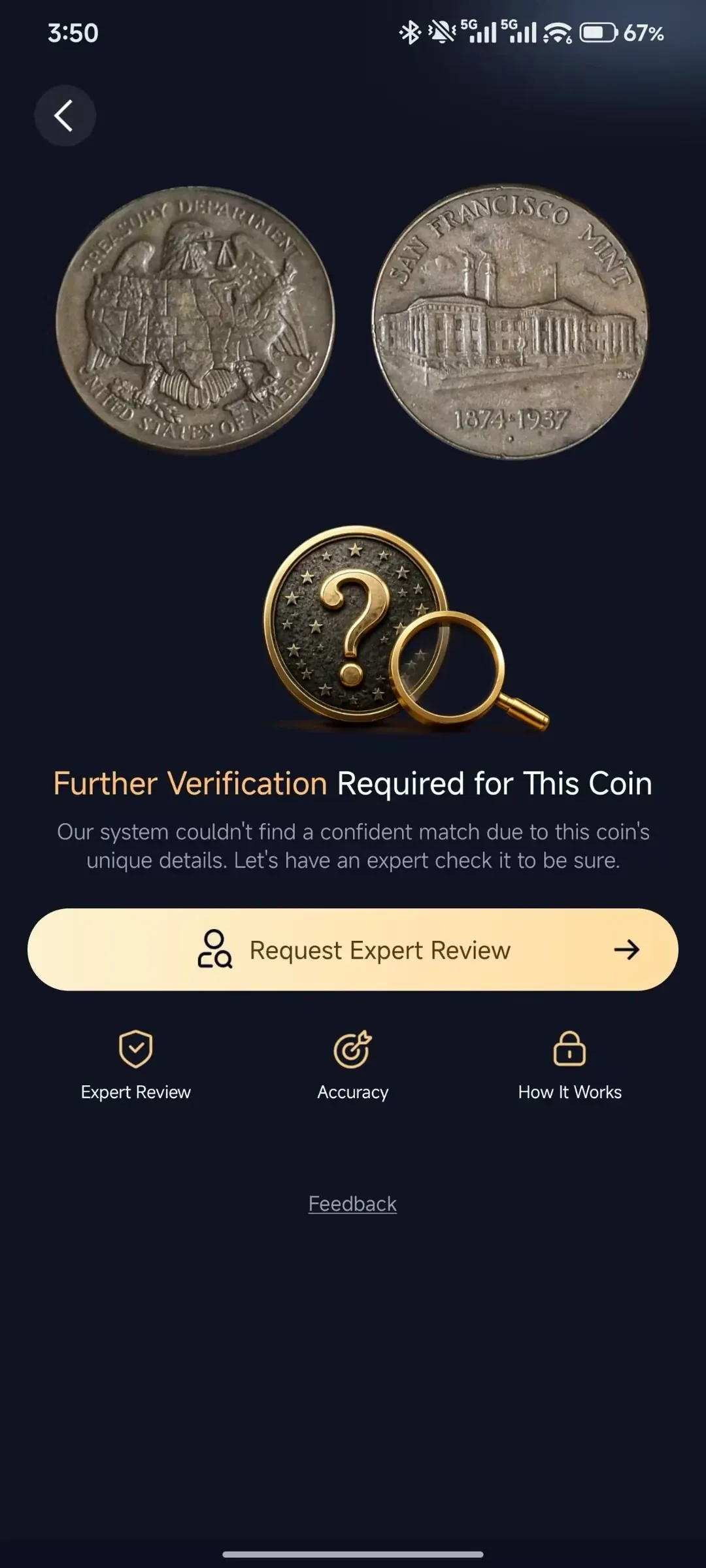
- Photographed faces
Read the inscriptions and dates on both sides before searching for a match. - Further Verification Required
The scan did not return a confident identification. - Request Expert Review
Open the optional expert service and check the scope and fee. - Feedback
Use this entry to report the result.
This scan returned Further Verification Required. The photos show San Francisco Mint lettering and the dates 1874–1937. The screen leaves the identification open. Read the inscriptions and consider whether you have a coin, medal or token when researching the item.
Retake the front and back with the item centered, in focus and free of glare. Add a rim view if it could help and record the diameter or weight if available. Scan again with the new photos. If there is still no confident match, contact HeriBase support with both photos and the result screenshot to ask whether the app supports identifying this item. If a material question remains, such as authenticity or a possible valuable variety, consider a paid expert review after checking its scope and fee.
See the photo and scanning steps or the expert appraisal fee guide.
Frequently asked questions
Can I use a HeriBase result as a confirmed identification?
Use the result as a starting point. Verify the design, denomination and date, then check the mint mark for coins or the printed series and serial number for banknotes. Review the coin example.
Why might the reference price differ from what my item sells for?
The displayed price refers to the suggested entry. Confirm the issue, variety, condition and currency before comparing it with completed sales. See how to read the reference price.
What should I do if HeriBase identifies my coin or banknote incorrectly?
Poor lighting, glare or blur can affect the match. Retake both sides in even light and capture a sharp close-up of the detail that differs. If the result is still incorrect, send HeriBase support the photos, a screenshot of the result and the detail that differs. See how to correct a mismatch.
What does Further Verification Required mean?
Retake clear photos of both sides and scan again. If there is still no confident match, send the photos and result screenshot to HeriBase support and ask whether the item is supported. If authenticity or a potentially valuable variety remains uncertain, consider a paid expert review after checking its scope and fee. See what to do when there is no match.
What do the coin specifications tell me?
They describe the suggested catalog entry. Compare the listed metal, diameter and weight with the physical coin and verify the date and mint mark separately. See the coin specifications walkthrough.
Can I use the detected banknote serial number directly?
Check every character against the printed serial first. Use the verified number to check for patterns. Open the Fancy Serial Number Checker.
When should I pay for expert appraisal?
Consider a paid review when authenticity or a potentially valuable variety remains uncertain. Check what the selected expert covers and the fee before ordering. See expert appraisal fees.